


VidVast
4.67.00 Reviews
App Specs
- Version
- 1.0.8
- Updated On
- License
- Free
- Downloads
- 10,000+
- Developer
- Rojo Games
- Categories
- Video Players & Editors
- Platform
- Android
Screenshots

 Analysis by AppCompare
Some video apps try to do everything at once: edit clips, add effects, share projects, and organize a growing library. VidVast takes a quieter approach. Rojo Games presents it as a video-focused app built around giving each recording a name, a note, and a point in time. After spending time with it, I found that its appeal is less about flashy editing and more about making personal videos easier to recognize later.
That difference matters. A phone gallery can hold hundreds of clips, but a thumbnail rarely tells me why I recorded something or what I wanted to remember. VidVast is aimed at that small gap between “I have the video” and “I can actually find the right video when I need it.” It is free, rated for Everyone, and belongs to the video players and editors category, although its most interesting use is closer to lightweight video journaling and personal cataloging than traditional editing.
My overall impression is that VidVast works best when you want meaning and context around your videos, not a full production studio. If you regularly record family moments, demonstrations, travel memories, lessons, or personal notes, its simple approach can feel more useful than a crowded editor. If your priority is trimming, transitions, captions, filters, or social-media templates, the usual editing alternatives remain more suitable.
How VidVast feels in everyday use
The current version is 1.0.8, and that gives the app the feel of a focused early product rather than a mature all-purpose media suite. I do not see that as a criticism by itself. A narrow purpose can make an app easier to understand, especially when the task is simply to attach useful information to a video instead of turning it into a finished production.
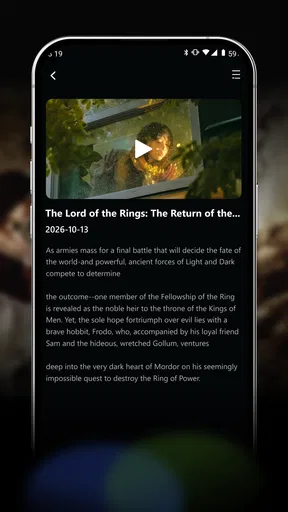
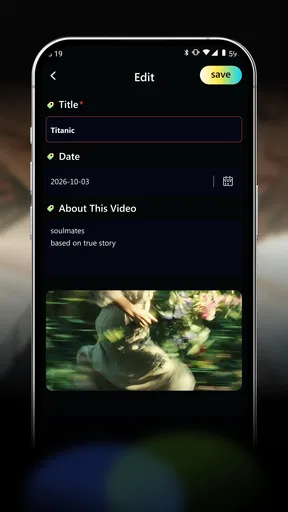
The basic idea is easy to explain: a video receives a name, a note, and a moment in time. Those three details change how I think about storing clips. A name can identify the subject quickly, a note can preserve the detail that a thumbnail forgets, and the time marker can place the recording in a personal timeline. Used together, they create a small amount of structure without asking me to build a complicated filing system.
For example, I could save a clip with a name that identifies the event, then use the note for a detail such as who was present, what needed fixing, or why the recording mattered. That is more practical than leaving a file with an automatically generated camera name. It also avoids the opposite problem of writing a long description that takes more effort than the video is worth.
I found the app most appealing for videos I expect to revisit rather than clips I plan to publish immediately. A short recording of a child’s first attempt at something, a repair demonstration, or a personal reminder benefits from context. A casual clip intended for a quick social post does not necessarily need another layer of organization.
Worth Reading Before You Choose

EA SPORTS FC Mobile 26 Is a Bigger Football Game, but It Takes Time

Flipboard Shows What News Apps Must Do Beyond the Feed

Switching to Android Auto Means Rethinking Your Driving Routine

Google Calendar Makes a Crowded Week Easier to Manage

Ludo King Makes the Most of the Minutes Between Plans

Baby Panda World Brings Quick Play to Modern Phones, but Its Game Library Feels Busy
A realistic routine for personal video memories
Imagine returning from a weekend trip with several short recordings. In a normal gallery, I might remember the general day but not which clip shows a particular place. With VidVast, I can give each video a clear name and write a note about the moment: a viewpoint, a conversation, or a small detail that would otherwise disappear from memory. Later, the note becomes a faster clue than opening every thumbnail.
The same workflow suits parents, students, and anyone who records progress over time. A student could label practice recordings with the subject and add a note about what to improve next. Someone learning a craft could keep a sequence of demonstrations and use the note to record materials or mistakes. A family could preserve short clips with enough context that another person can understand them without asking when or why they were made.
The useful insight here is that the note should not repeat the name. I would use the name for the searchable identity of the clip and the note for information that changes its value later. “Kitchen shelf repair” is a useful name; “measure bracket before buying screws” is a useful note. That separation makes the system more helpful than simply renaming files.
Who will appreciate the quieter design
VidVast should appeal to people who feel that their camera roll has become a pile of unlabeled memories. It is also a reasonable choice for users who do not want to learn a timeline editor just to keep short recordings understandable. The Everyone age rating makes it approachable for a broad audience, and the free price removes the need to commit financially before seeing whether this style of organization fits a personal routine.
It may also suit someone who prefers deliberate, private-feeling organization over public sharing. The store summary’s emphasis on keeping videos quietly yours matches the way I would use it: as a personal record rather than a social feed. That does not mean every user will need it, but it gives the app a recognizable identity in a category often dominated by editing and publishing.
On the other hand, I would not choose it as my main tool for assembling a polished video. The app’s stated concept centers on labeling and context, not on replacing a full editor. If I needed precise cuts, layered audio, visual effects, animated text, or export-oriented controls, I would reach for a dedicated editing app instead. VidVast makes more sense before or alongside that process, not necessarily instead of it.
What the current release tells me about its direction
Rojo Games released VidVast on May 28, 2026, and the present 1.0.8 build suggests that the product is still establishing its foundation. I would be careful about treating it as a finished answer to every video-library problem. At this stage, the strongest evidence is the focused concept itself and the fact that the app has already attracted over ten thousand installs with a 4.6 average from around three hundred ratings.
Those figures indicate that the idea is resonating with a meaningful group of users, but they do not prove that it will replace a gallery, editor, or cloud library for everyone. The number of ratings is still modest compared with long-established media apps, so I would interpret the reception as encouraging rather than conclusive. The most important test is whether the workflow remains useful after the novelty of labeling the first few videos wears off.
The version number also matters in a practical way. A new app can have a clean central idea while still needing refinement around the edges. I would pay attention to how smoothly it handles a growing collection, whether adding notes stays quick, and whether the organization remains comfortable when a user has many similar recordings. These are not assumptions about hidden behavior; they are the areas that naturally determine whether a cataloging tool becomes a habit.
How existing users can get more from the concept
If I were already using VidVast, I would create a consistent naming pattern before adding a large number of videos. For personal memories, I might begin with the event followed by the subject. For learning clips, I might start with the skill and then the stage of progress. Consistency reduces the mental work of deciding what to type every time and makes the collection feel intentional.
I would also keep notes short enough to scan. A note is most valuable when it answers a future question quickly. Who is in the clip? What changed? What should I remember? Where did this happen? A compact answer is easier to use than a diary entry attached to every recording. This is one of the app’s less obvious strengths: its simplicity encourages a lightweight habit rather than demanding full documentation.
Another useful workflow is to label videos immediately after recording a group of related clips, while the context is still fresh. Waiting several months makes it harder to remember the details that give a recording its value. I would reserve a few minutes after an event to name the important clips and add notes only where the thumbnail is ambiguous. That keeps the system from becoming a second job.
For users who also edit videos, VidVast can serve as a staging library. I could use the name to mark the purpose of a raw clip and the note to record how it might be used later. For instance, a note could distinguish an establishing shot from an interview segment or identify a take worth revisiting. The app would not replace the editor, but it could help prevent useful source material from disappearing among unmarked files.
Where the simple approach creates friction
The same restraint that makes VidVast approachable may limit it for people with demanding media workflows. A name, note, and time marker provide helpful context, but they are not the same as folders, tags, advanced search, collaborative review, or a complete editing timeline. I would not assume that a small set of labels can handle a professional archive or a large production without additional tools.
There is also a habit cost. The app can only improve a collection if I actually add the information. Someone who records constantly and never wants to type after each clip may find the process slower than relying on automatic gallery sorting. In that situation, the benefit appears later, while the effort happens immediately. VidVast is therefore better for users who value future retrieval enough to spend a few seconds organizing now.
Another trade-off is that a quiet personal catalog may not satisfy users who want instant sharing. A social editor usually makes publishing the center of the experience, with ready-made formats and presentation tools. VidVast’s identity is different. I would use it when the video’s personal meaning matters more than turning it into a polished post.
For people concerned about changing phones or managing several devices, I would make an important practical check before building a large archive: understand how the app fits into the rest of your backup routine. A video catalog is only truly useful if the recordings and their context remain available when your device changes. I would keep important originals backed up through my normal phone or computer process rather than treating any single app as the only copy.
How it compares with the usual alternatives
A standard gallery is faster for automatic capture and often already familiar, but it can leave personal meaning hidden behind thumbnails and timestamps. VidVast adds intentional context, which is its main reason to exist. The gallery wins when I want zero setup; VidVast wins when I expect to search my memory later.
A full video editor offers much more control over the image and sound. It is the better choice for a finished presentation, a tutorial, or a social clip that needs polish. VidVast is less intimidating and more appropriate when the recording itself is already enough and the missing piece is a clear identity.
Cloud photo services can be stronger for automatic synchronization, broad device access, and large media libraries. Their organization is often based on dates, faces, places, or machine-generated categories. VidVast’s appeal is more deliberate: I decide what the video means by giving it a name and note. That human input may be more useful for unusual personal events that automatic grouping cannot understand.
Note-taking apps can store descriptions beside embedded videos, but they may feel disconnected from a video-first workflow. VidVast’s focused category placement suggests a more direct relationship with the recordings themselves. I would choose a note app when the video is one part of a larger project, and VidVast when the video is the central object and the surrounding context should stay concise.
Questions I would consider before installing
Is it suitable for a beginner? Yes, if the goal is to keep videos understandable rather than edit them. The concept is easy to grasp, and the Everyone rating supports its broad accessibility. I would still begin with a small set of meaningful clips instead of importing everything at once, because the value comes from creating a useful habit and naming items consistently.
Can it replace a normal video editor? I would not treat it that way. Its clear identity is organizing video context, not promising a complete production workflow. Anyone choosing it for trimming, effects, captions, or elaborate exports is likely to be happier with a dedicated editor and may use VidVast only as a companion.
Is it useful if I record only occasionally? It can be, especially when the recordings are important and easy to confuse later. Someone who makes only a few disposable clips probably will not gain much from adding metadata. Someone who records rare events, personal progress, or family memories may find the small amount of labeling worthwhile precisely because those videos are not made every day.
Should I use names or notes more heavily? I would keep names short and distinctive, then use notes for the detail that gives the clip future meaning. If a title becomes a paragraph, it is doing the note’s job. If the note merely repeats the title, it is not adding much. That simple division is the best way I found to preserve the app’s speed.
What should I watch as the app develops? I would look for improvements that protect its central simplicity while making larger collections easier to manage. Better ways to revisit older clips, dependable handling of growing libraries, and a smooth path alongside existing backup and editing tools would matter more to me than adding a long list of decorative effects. The product will be strongest if future changes deepen its organization purpose instead of turning it into another crowded editor.
My final recommendation
VidVast is a thoughtful option for a very specific problem: remembering what a video is and why I kept it. Rojo Games has chosen a modest, understandable foundation, and the current release already communicates that purpose clearly. I like that it does not need to compete directly with every editing suite to be useful.
I would recommend it to anyone building a personal video journal, organizing short learning recordings, or trying to rescue meaningful clips from an anonymous camera roll. I would skip it as a primary tool if my daily work depends on advanced editing, instant publishing, or a large professional media-management system. In those cases, a gallery, cloud library, or dedicated editor will remain the better center of the workflow.
For me, the deciding question is simple: do I want to change the video, or do I want to remember it? If the answer is the second one, VidVast offers a calm and practical way to add just enough context. Its free access makes experimentation easy, while its early version leaves room to see how well the idea grows. I would start small, develop a naming habit, and judge it by one result: whether finding an old video becomes easier and more meaningful than opening random thumbnails.
Pros
- Simple interface makes browsing and discovering videos easy.
- Supports quick playback for convenient viewing on mobile devices.
- Offers varied video content for different viewing preferences.
- Search tools help locate specific videos with minimal effort.
- Lightweight design can work well on many Android and iOS devices.
Cons
- Content availability may vary by region or change without notice.
- Some features may require an account or additional permissions.
- Video quality can depend heavily on your internet connection.
- Advertising may interrupt browsing or playback in some sections.
- Privacy details should be reviewed before creating an account.
FAQs for VidVast
What is VidVast, and what can I use it for?
VidVast is a video-focused application designed for discovering, watching, and managing online video content from a mobile device. Depending on the version and region, it may offer features such as categorized content, search tools, personalized recommendations, and playback controls. Before downloading, users should check the current store description because available content, supported services, and features can change over time.
Is VidVast free to download and use?
VidVast may be available as a free download, but the overall cost depends on how the app is monetized. Some functions may be supported by advertisements, while other features could require in-app purchases, a subscription, or access to third-party services. We recommend reviewing the pricing section in Google Play or the App Store and checking renewal terms before starting any trial.
Is VidVast safe and trustworthy to install?
As with any video or entertainment app, VidVast should be downloaded only from an official app marketplace or a verified source. Before installation, review the developer name, permissions, privacy policy, recent user feedback, and update history. Avoid unofficial APK files or modified versions, since they may contain unwanted software, request excessive permissions, or expose your personal information.
Does VidVast work on both Android and iPhone?
Compatibility depends on the official release of VidVast and the operating system version installed on your device. Check the Google Play or Apple App Store listing for supported Android and iOS versions, device requirements, and regional availability. Performance may also vary between older and newer phones, particularly when streaming high-quality video or using the app over mobile data.
Does VidVast require an account or an internet connection?
Most video applications require an active internet connection for browsing and streaming, and VidVast may work best on stable Wi-Fi or a reliable mobile network. An account might be needed for personalized recommendations, saved content, synchronization, or premium features, while basic browsing could potentially be available without registration. Check the app’s current privacy and login requirements before creating an account.


